
AI Subtitle Translation Tools 2026: 6 Platforms That Translate + Burn-in in One Pass
Which AI subtitle translation tool lets you translate and burn captions directly into the video in one pass? Compare 6 leading tools (Descript, CapCut, Veed, Kapwing, Subtitle Edit, BibiGPT) across 5 must-have dimensions and pick the right fit in 10 minutes.
AI Subtitle Translation Tools 2026: 6 Platforms That Translate + Burn-in in One Pass
Contents
- Which AI Subtitle Translation Tool Burns Captions Back Into the Video?
- Picking Dimensions: Why Translate + Burn-in Has to Be One Step
- 6 AI Subtitle Translation Tools Compared
- By Use Case: Creator, Enterprise, Learner
- BibiGPT's Edge: Beyond Translation, Into Knowledge Artifacts
- FAQ
- Wrap-up
Which AI Subtitle Translation Tool Burns Captions Back Into the Video?
Quick answer: If you want a single tool that translates your audio/video and burns captions straight back into the final file, BibiGPT is the most hands-off AI subtitle translation tool in 2026 — tick your target language at upload, the system translates during transcription, and you can export either a hard-subbed short video or a bilingual SRT with one click. If you already live inside a video editor, Descript or CapCut's "Auto Translate + Burn-in" covers most cases. Below, we lay all 6 tools side-by-side on 5 dimensions so you can pick in 10 minutes.
Try pasting your video link
Supports YouTube, Bilibili, TikTok, Xiaohongshu and 30+ platforms
The subtitle translation race in 2026 has evolved from "just translate" to "translate + burn-in + summarize + repurpose." Creators going global, cross-border enterprise training, language learners — everyone wants to collapse 3 tools into 1.
This article will show you the real gaps between 6 mainstream options:
- Which one's translation quality feels human, not machine
- Which one makes burn-in (hard subs) painless
- Which one still exports bilingual SRT for downstream editing
- Which one goes further — auto-summary, mind map, repurposing into articles and shorts
Picking Dimensions: Why Translate + Burn-in Has to Be One Step
Quick answer: A production-grade AI subtitle translation tool must cover 5 things at once — translation quality, burn-in (hard subs), bilingual SRT export, platform coverage, and a "next step" after translation. Miss any one and you're back to juggling 3 apps.
A typical painful workflow looks like this:
- Translate with Whisper / DeepL into an SRT
- Drag the SRT into Premiere / CapCut, fix timing and styling
- Burn-in and export — realize timing drifted, repeat
One-stop tools compress those 3 steps into a single action. Here are the 5 must-have dimensions:
| Dimension | What it checks | Why it matters |
|---|---|---|
| Translation quality | Does it keep idioms, terminology, register? | Viewers drop off fast on stiff MT |
| Burn-in | One-click hard subs? | TikTok / Shorts / Reels depend on it |
| Bilingual SRT export | Original + translated lines preserved? | Needed for repurposing |
| Platform coverage | YouTube / Bilibili / local files? | Saves download + re-encode |
| Next step | Auto-summary, mind map, article repurposing? | Turns translation into a knowledge artifact |
BibiGPT's auto-translate on upload collapses the first two steps: pick a target language at upload, transcription + translation run together.
6 AI Subtitle Translation Tools Compared
Quick answer: Each of the 6 tools has a different sweet spot — BibiGPT wins on "translate + burn-in + summarize" in one go, Descript wins inside an editing workflow, CapCut wins on mobile speed, Veed / Kapwing win as zero-install browser tools, Subtitle Edit wins for professional timeline control.
1. BibiGPT — Translate, Burn-in, Summarize, All in One Pass
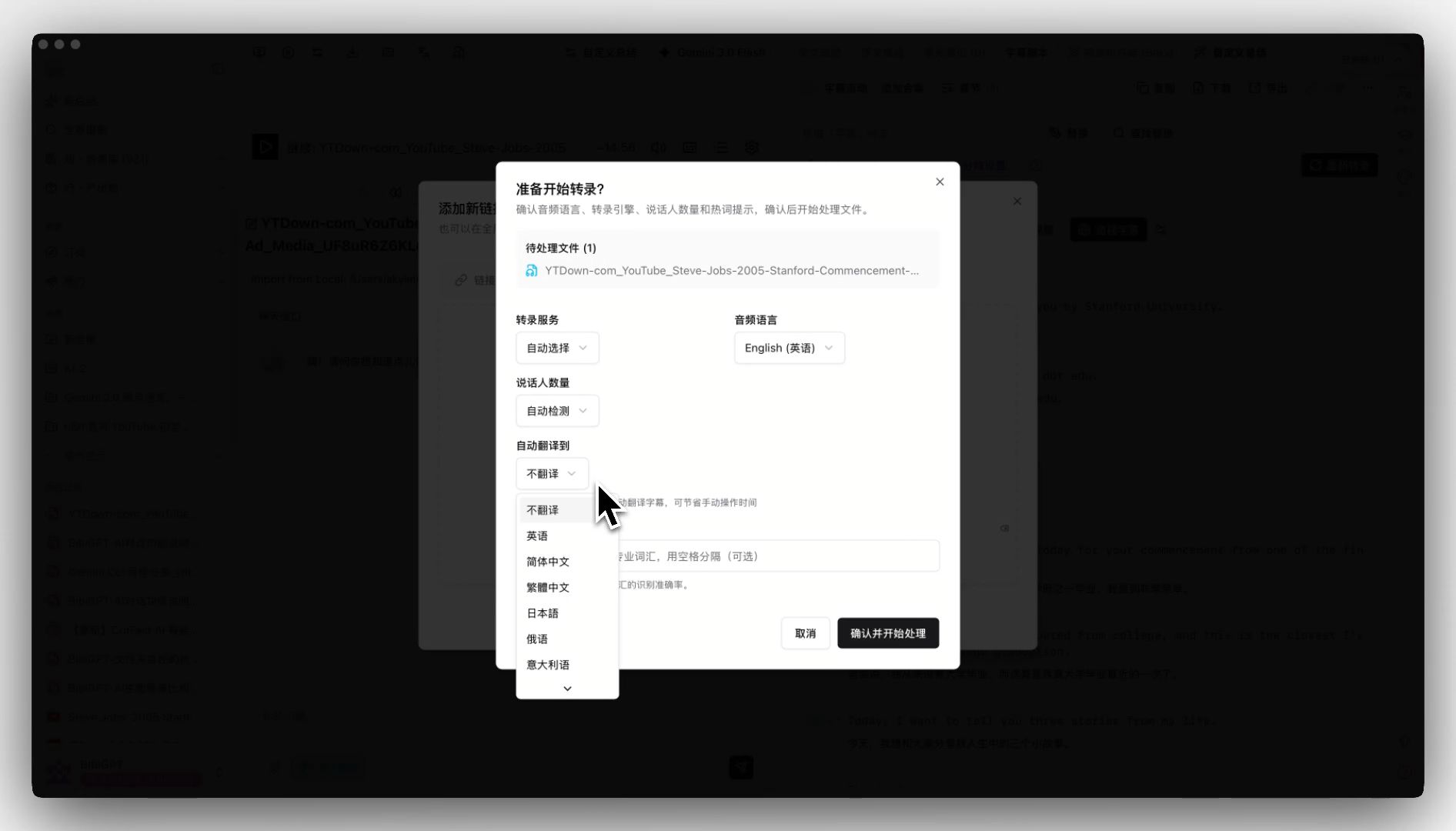 Auto-translate on upload entry
BibiGPT's core bet: translation is the start, not the end. At upload, pick a target language (EN→ZH, JA→ZH, KO→EN, etc.). Transcription and AI translation run together, and by the time you blink you have a bilingual subtitle track, a structured summary, and time-stamped highlight notes.
- One upload, and you get translation + transcription + summary + mind map
- Paste links from 30+ platforms — no need to download the source video
- After translation, export a hard-subbed short video (MV Editor) or a clean SRT in one click
- Pair with SRT sync export to auto-drop a copy into your local
/srtfolder for Premiere or CapCut desktop
Best for: global creators, cross-border training teams, language learners.
2. Descript — "Text Is Video" Inside the Editor
In 2026 Descript merged Overdub (voice clone) + Translate into a single button — you rewrite the caption in another language, it redubs with the original speaker's voice. For vlogs and course explainers, this "edit script = edit audio" flow is slick.
- Strength: editor + translate + redub all-in-one
- Limit: pricey (Pro $24/mo up), uneven support for smaller languages
Best for: English-first vloggers, course instructors.
3. CapCut — The Fastest Mobile Auto Translate + Burn-in
ByteDance's CapCut baked "auto captions → translate → burn-in" into a single panel in 2026; you can ship a finished vertical video in 3 minutes on your phone. For TikTok / Reels / Shorts creators, it's plug-and-play.
- Strength: mobile end-to-end, template-driven shipping
- Limit: translation tuned to short-form; quality wobbles on long videos
4. Veed — A Browser-Based One-Stop Subtitle Editor
Veed's killer feature is "no install." Drop a video in the browser, click Auto Translate, wait 5 minutes — you get bilingual SRT + burned-in video. You can fine-tune font, color and position in the same page.
- Strength: zero install, clean UI, broad language support
- Limit: free tier has watermark + length cap
5. Kapwing — Subtitle Translation for Collaborative Teams
Kapwing leans into collaboration — multiple editors can edit captions and translations in the same project. Great for in-house media teams and marketing departments.
- Strength: multi-editor + versioning
- Limit: pacing is slower than Veed, translation depends on third-party APIs
6. Subtitle Edit — Open-Source Favorite for Pros
Translators working on films and documentaries who demand millisecond timing will pick Subtitle Edit — open source, free, supports many translation APIs. Burn-in needs FFmpeg; it's more steps but fully under your control.
- Strength: professional, free, no watermark
- Limit: steep learning curve, burn-in is external
See BibiGPT's AI Summary in Action
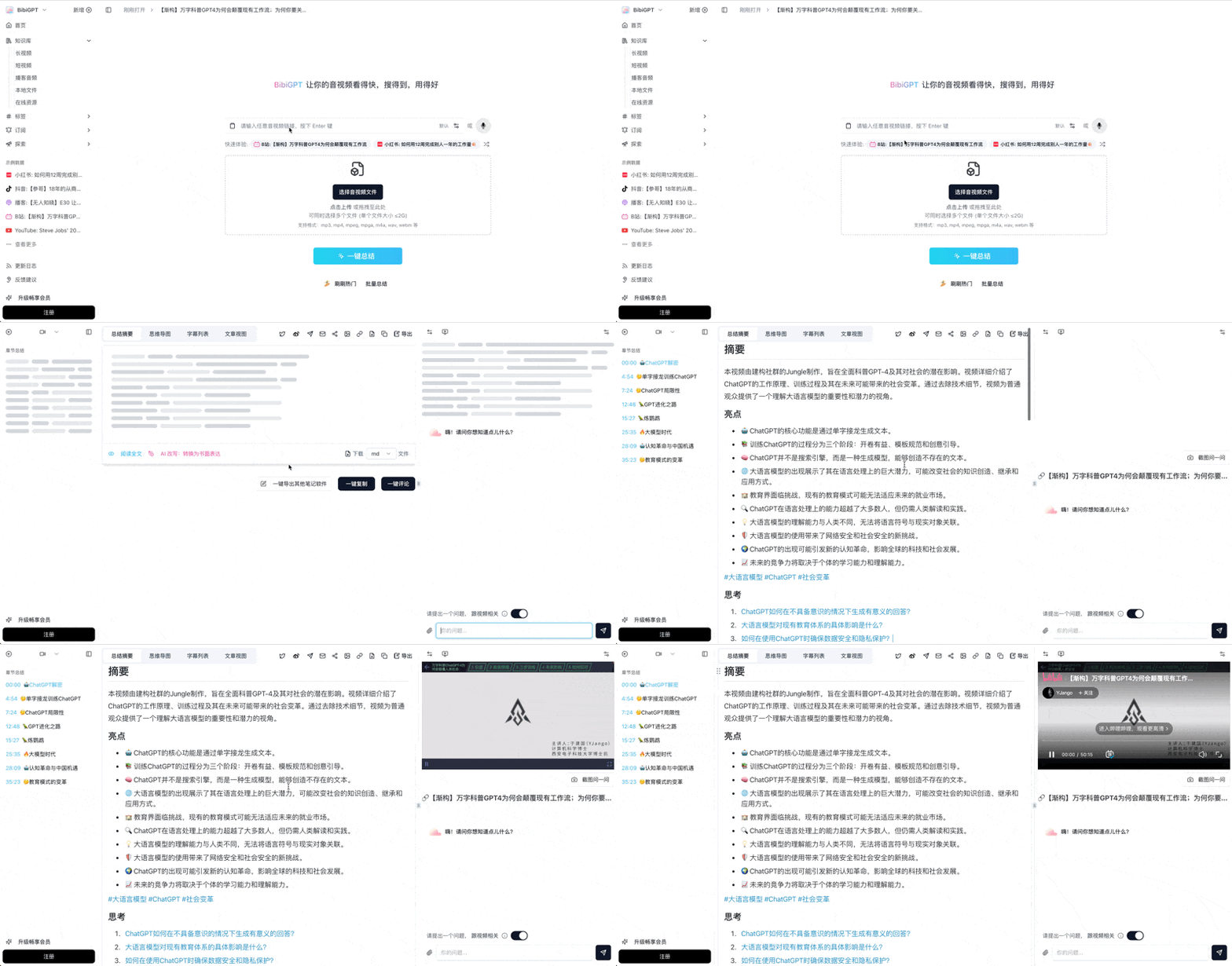
Bilibili: GPT-4 & Workflow Revolution
A deep-dive explainer on how GPT-4 transforms work, covering model internals, training stages, and the societal shift ahead.
Want to summarize your own videos?
BibiGPT supports YouTube, Bilibili, TikTok and 30+ platforms with one-click AI summaries
Try BibiGPT FreeBy Use Case: Creator, Enterprise, Learner
Quick answer: Map your scenario to a "primary tool → fallback" pair. Don't start with the most complex one.
| Scenario | Primary | Fallback |
|---|---|---|
| Language learner decoding one video fast | BibiGPT (translate + structured summary + flashcards) | Veed |
| Creator localizing for YouTube / TikTok | BibiGPT (translate + MV short video burn-in) | CapCut |
| English vlogger making multilingual versions | Descript (voice clone) | BibiGPT + manual dub |
| Enterprise cross-border training | BibiGPT (collection summary + bilingual SRT) | Kapwing |
| Documentary / film subtitle fine-tuning | Subtitle Edit (ms-level timing) | + BibiGPT for first draft |
| TikTok / Reels creators editing on mobile | CapCut (end-to-end) | BibiGPT for pre-processing |
Research from Cambridge English shows bilingual subtitles boost video learning retention by around 25% vs monolingual — which is why BibiGPT makes bilingual the default: many users never go back to single-language captions.
BibiGPT's Edge: Beyond Translation, Into Knowledge Artifacts
Quick answer: BibiGPT's biggest differentiator is treating "translate + burn-in" as the start of a knowledge pipeline, not the end. After translating, you can one-click into AI highlight notes, mind maps, small-red-book-style image posts, and two-host podcast audio.
Hard-sub OCR: for videos that already have subs burned in
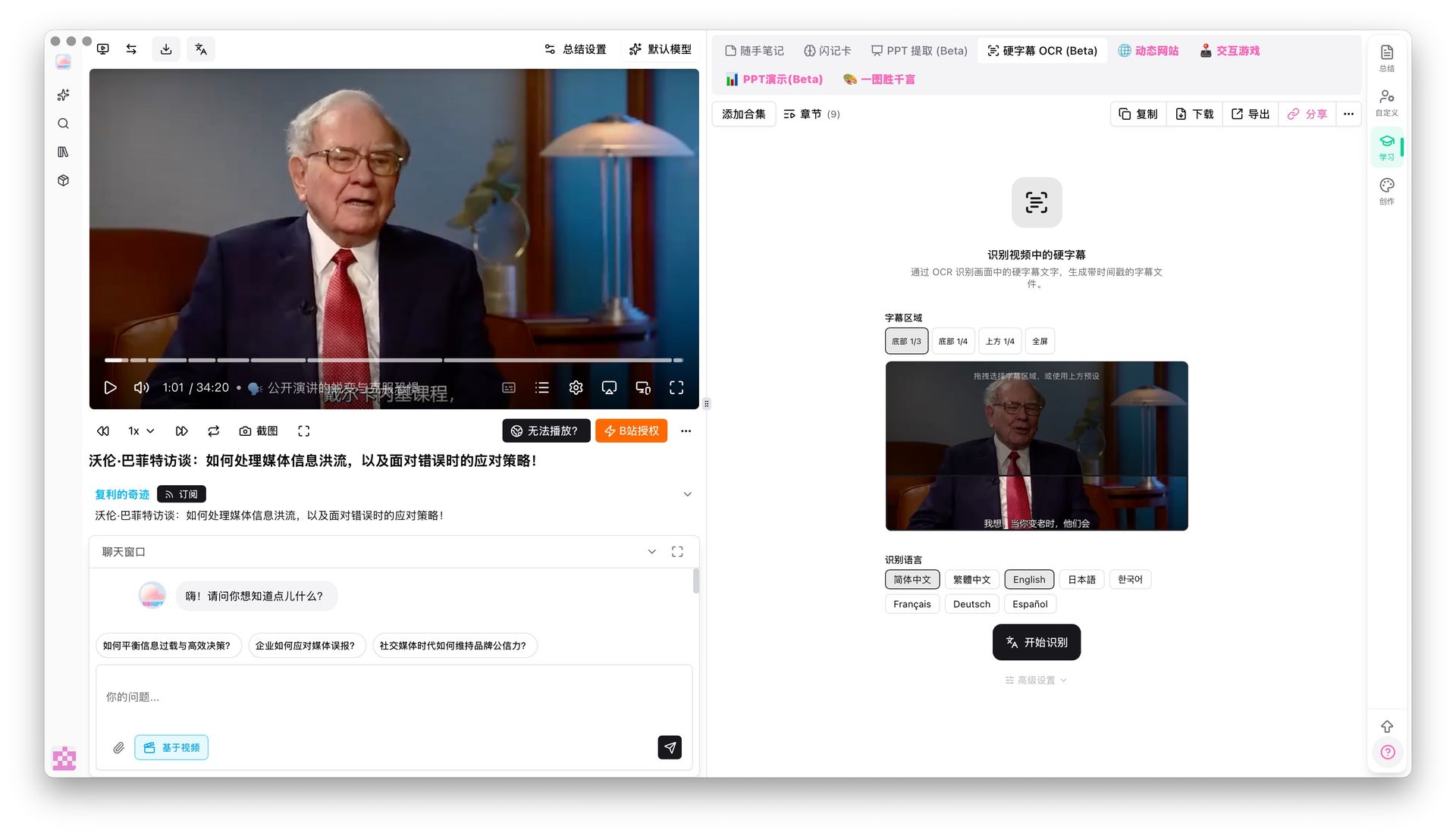 Hard-subtitle OCR demo
When the foreign video you want to translate already has subs burned onto the frame (interviews, online courses, film clips), speech-to-text may drift. BibiGPT's hard-sub OCR (Beta) pulls text straight from the pixels and feeds it into the translation pipeline — much more accurate than pure ASR.
Smart subtitle segmentation: turn choppy lines into readable paragraphs
 Smart subtitle segmentation entry
Freshly translated subs are often choppy, which hurts SEO and repurposing. BibiGPT's smart subtitle segmentation offers one-click presets (Short / Long / CJK-optimized) and live preview of line-count changes (e.g. 174 lines → 38), so the script is immediately readable.
Translate → Summary → Posts → Podcast — one production line
BibiGPT's full flow looks like:
- Upload foreign video + pick target language (auto-translate on)
- System outputs: bilingual subtitles + AI summary + mind map
- One-click into small-red-book image posts, WeChat-style articles, short videos (MV Editor)
- Need an SRT? SRT sync export auto-drops one into your local folder
By contrast, Descript / Veed stop at "subs + video." The downstream knowledge work (summary, posts, podcast) still needs other tools. Further reading: AI subtitle translation bilingual workflow and YouSubtitles alternatives.
FAQ
Q1: Which tool supports Chinese / Japanese / Korean best?
A: BibiGPT is designed natively for Chinese and East Asian users; translation quality across ZH / JA / KO / Traditional Chinese / English is consistently strong, especially for technical terms and idioms. Descript / Veed are stronger on English → European languages.
Q2: Can I burn translated subs into a short video for TikTok / Reels?
A: Yes. BibiGPT's MV Editor produces hard-subbed short videos sized for TikTok, Reels and Shorts right after translation. CapCut does the same, but you pick templates manually.
Q3: Can I take the SRT into Premiere / Final Cut for more editing?
A: Yes. BibiGPT exports standard SRT and supports auto sync to a local folder so Premiere / Final Cut / CapCut desktop can pick it up immediately.
Q4: Is the free tier enough?
A: BibiGPT's free quota covers 2-3 videos per day for individual use; CapCut free has watermarks; Veed free caps export length; Subtitle Edit is fully free but requires your own translation API.
Q5: What about long videos (2h+)?
A: BibiGPT processes long videos asynchronously and notifies you when done. CapCut / Veed struggle with long files; Subtitle Edit handles any length locally but takes longer.
Wrap-up
In 2026, AI subtitle translation isn't a one-dimensional "who translates more accurately" race — it's about who can stitch translation, burn-in, summarization and repurposing into one line. BibiGPT goes the furthest: from pasting a link to getting a hard-subbed final + bilingual SRT + AI summary + mind map without ever switching apps.
If you just need "translate once, burn-in once, done," Descript / CapCut / Veed are perfectly fine. But if you're regularly processing foreign videos for global distribution, cross-border training, or language learning, adding BibiGPT upgrades "one translation" into "a whole knowledge artifact."
Start your AI efficient learning journey now:
- 🌐 Official Website: https://aitodo.co
- 📱 Mobile Download: https://aitodo.co/app
- 💻 Desktop Download: https://aitodo.co/download/desktop
- ✨ Learn More Features: https://aitodo.co/features
BibiGPT Team